


Photomotion X 10.3.2 – Biggest Photo Animation Toolkit (5 in 1)

Welcome Photomotion X
We’ve spent years perfecting the art of animating static pictures. Photomotion X is the result.
Five Products in One.
The largest photo animation toolkit ever created.
Portrait
Animate any face with the most advanced portrait projection on the market.
Glacier
Create truly engaging cinemagraphs directly inside of Photomotion.
Mirage
Make your skies, smoke and water move with our new Mirage toolkit.
Horizon
Professional 3D projection for truly photorealistic results. Completely revamped in Photomotion X.
Parallax
Create stunning animations by combining simple parallax effect with the power of Photomotion.
more coming soon
We aim to create the most complete photo animation toolkit on the planet. Expect new animation tools soon.
100 New Features
Photomotion X is the biggest update we’ve ever created. It combines years of experience into one tool that brings more than 100 new features to you.
Easier Than Ever with Smart Interface.
Compatible with Mac & Windows. Requires Adobe After Effects installed on your computer.
Your Command Centre. Our proprietary Smart Interface is constantly adapting to your actions, making it is easier than ever to use Photomotion. Developed by leading user experience designers to make sure you don’t need to read tons of tutorials to start using Photomotion. Save & Take with you.
Working on multiple computers just got easier. Photomotion doesn’t require installation so you can simply move your project to another computer and continue working where you left off. Comes with full support for Windows and Mac OS.
One-Click 3D Particles
29 Fully Integrated Particle Systems
With the new Photomotion X you can add professional 3D particles to your scene with a single click. Photomotion will automatically animate them for you so you don’t need to spend any time at all and your image will immediately look more engaging.
Most popular:
Snow, Rain, Leaves & Petals, Dust, Time – Freeze 24 more particle systems
One-Click Seamless Loops
Auto-Loop.
Create infinitely long animations with our new auto-loop feature. One click and Photomotion will calculate all loops for you.
Boomerang.
Prefer boomerang effect? Photomotion X comes with one-click function to create boomerang animations for you.
Packed with 100 Features
Photomotion X is the largest photo animation toolkit ever created, packed with features to help you create stunning images easier.5 products in 1, Scene Relight, Camera Follow, Eyes Scale, Face Makeup, Slideshow Builder, Resolution Previews, Auto-Loop 92 more
Variations.
Create variations of your animation for different channels without re-animating your image again. This allows you to create multiple versions of the same animation in just a few clicks.
Photomotion Presets
Export different variations of your animation for different channels without need to re-animate your image.
Buy Once. Animate Forever.
We created Photomotion to help more people get into photo animation. Limiting how many pictures you could convert would go against our vision. We don’t put any limits on number of pictures you convert with Photomotion.
Portrait
Photomotion Portrait is the most advanced and feature rich projection for animating portrait photos. With most sophisticated projection engine on the market.
Use X-ray:
Photomotion uses professional 3D body scans to give you the most realistic depth maps you can get.
True Depth:
Let our proprietery Photomotion Xray calculate 3D mesh by simply choosing positions of your eyes and nose.
Move in 3D space:
Use Smart Interface to move your face in real 3D space, add particles, enhance your animation and export your video.
Glacier
Photomotion Glacier can create engaging cinemagraphs by freezing a part of your video while the rest continues to play in seamless loop or boomerang animation.
Import Video:
Import a video into Glacier where you will be able to stabilize it and make it ready for the next step.
Freeze:
Freeze one or more areas of your video by simply drawin a mask around it. All inside of After Effects.
Auto-Loop:
Glacier will automatically calculate seamless loops for you, so you can export your final video to any length.
Mirage
Photomotion Mirage combines the power of animating water, skies, smoke and others with our auto-loop system to create illusion of a movement in your photos.
Mask:
Import an image and create a mask around the area you want Mirage to animate. All inside of After Effects.
Mesh Move:
Mirage will calculate a mesh in your masked area and give you tools to animate it however you want.
Seamlessly Looped:
Mirage will then automatically caculate a seamless loop for you and let you export infinitely long animation.
Horizon
Photomotion Horizon is a professional 3D projection without the need to learn or use any 3D software. This is the most feature rich projection in Photomotion X.
Use 3D Cage:
Horizon uses our special control system for setting up a real 3D space by using intuitive user interface controls.
Add Objects:
Add objects to your scene such as people and let Horizon do the hard work of calculating their real 3D position.
Animate & Export:
Horizon offers the most advanced tools for photo animaiton. Use them to create stunning end results.
Parallax
Photomotion Parallax combines the power of Photomotion engine with the simplicity of parallax effect to create beautiful animations in no time.
Add Background:
Add the main layer to Parallax. That’s usually a background of your image.
Add Layers:
Add multiple objects into the scene, position them wherever you want and build your own 2.5D scene.
Have Fun!
Move the camera by using our Smart Interface and watch your layers come to life without need to set-up animations manually.
Suitable for beginners
Photomotion
Easy to use and optimised for complete beginners as well as professionals
Other
Most tools aren’t optimised for beginners and first time users
Suitable for professional use
Photomotion
full support for professional-grade tools, features and training
Other
most tools are offering very simple and limited featureset
Suitable for professional use
Photomotion
full support for professional-grade tools, features and training
Other
most tools are offering very simple and limited featureset
Number of projection methods
Photomotion
5 new coming soon
Other
1-2
Original price was: ₹150.00.₹49.00Current price is: ₹49.00.
Welcome Photomotion X
We’ve spent years perfecting the art of animating static pictures. Photomotion X is the result.
Five Products in One.
The largest photo animation toolkit ever created.
Portrait
Animate any face with the most advanced portrait projection on the market.
Glacier
Create truly engaging cinemagraphs directly inside of Photomotion.
Mirage
Make your skies, smoke and water move with our new Mirage toolkit.
Horizon
Professional 3D projection for truly photorealistic results. Completely revamped in Photomotion X.
Parallax
Create stunning animations by combining simple parallax effect with the power of Photomotion.
more coming soon
We aim to create the most complete photo animation toolkit on the planet. Expect new animation tools soon.
100 New Features
Photomotion X is the biggest update we’ve ever created. It combines years of experience into one tool that brings more than 100 new features to you.
Easier Than Ever with Smart Interface.
Compatible with Mac & Windows. Requires Adobe After Effects installed on your computer.
Your Command Centre. Our proprietary Smart Interface is constantly adapting to your actions, making it is easier than ever to use Photomotion. Developed by leading user experience designers to make sure you don’t need to read tons of tutorials to start using Photomotion. Save & Take with you.
Working on multiple computers just got easier. Photomotion doesn’t require installation so you can simply move your project to another computer and continue working where you left off. Comes with full support for Windows and Mac OS.
One-Click 3D Particles
29 Fully Integrated Particle Systems
With the new Photomotion X you can add professional 3D particles to your scene with a single click. Photomotion will automatically animate them for you so you don’t need to spend any time at all and your image will immediately look more engaging.
Most popular:
Snow, Rain, Leaves & Petals, Dust, Time – Freeze 24 more particle systems
One-Click Seamless Loops
Auto-Loop.
Create infinitely long animations with our new auto-loop feature. One click and Photomotion will calculate all loops for you.
Boomerang.
Prefer boomerang effect? Photomotion X comes with one-click function to create boomerang animations for you.
Packed with 100 Features
Photomotion X is the largest photo animation toolkit ever created, packed with features to help you create stunning images easier.5 products in 1, Scene Relight, Camera Follow, Eyes Scale, Face Makeup, Slideshow Builder, Resolution Previews, Auto-Loop 92 more
Variations.
Create variations of your animation for different channels without re-animating your image again. This allows you to create multiple versions of the same animation in just a few clicks.
Photomotion Presets
Export different variations of your animation for different channels without need to re-animate your image.
Buy Once. Animate Forever.
We created Photomotion to help more people get into photo animation. Limiting how many pictures you could convert would go against our vision. We don’t put any limits on number of pictures you convert with Photomotion.
Portrait
Photomotion Portrait is the most advanced and feature rich projection for animating portrait photos. With most sophisticated projection engine on the market.
Use X-ray:
Photomotion uses professional 3D body scans to give you the most realistic depth maps you can get.
True Depth:
Let our proprietery Photomotion Xray calculate 3D mesh by simply choosing positions of your eyes and nose.
Move in 3D space:
Use Smart Interface to move your face in real 3D space, add particles, enhance your animation and export your video.
Glacier
Photomotion Glacier can create engaging cinemagraphs by freezing a part of your video while the rest continues to play in seamless loop or boomerang animation.
Import Video:
Import a video into Glacier where you will be able to stabilize it and make it ready for the next step.
Freeze:
Freeze one or more areas of your video by simply drawin a mask around it. All inside of After Effects.
Auto-Loop:
Glacier will automatically calculate seamless loops for you, so you can export your final video to any length.
Mirage
Photomotion Mirage combines the power of animating water, skies, smoke and others with our auto-loop system to create illusion of a movement in your photos.
Mask:
Import an image and create a mask around the area you want Mirage to animate. All inside of After Effects.
Mesh Move:
Mirage will calculate a mesh in your masked area and give you tools to animate it however you want.
Seamlessly Looped:
Mirage will then automatically caculate a seamless loop for you and let you export infinitely long animation.
Horizon
Photomotion Horizon is a professional 3D projection without the need to learn or use any 3D software. This is the most feature rich projection in Photomotion X.
Use 3D Cage:
Horizon uses our special control system for setting up a real 3D space by using intuitive user interface controls.
Add Objects:
Add objects to your scene such as people and let Horizon do the hard work of calculating their real 3D position.
Animate & Export:
Horizon offers the most advanced tools for photo animaiton. Use them to create stunning end results.
Parallax
Photomotion Parallax combines the power of Photomotion engine with the simplicity of parallax effect to create beautiful animations in no time.
Add Background:
Add the main layer to Parallax. That’s usually a background of your image.
Add Layers:
Add multiple objects into the scene, position them wherever you want and build your own 2.5D scene.
Have Fun!
Move the camera by using our Smart Interface and watch your layers come to life without need to set-up animations manually.
Suitable for beginners
Photomotion
Easy to use and optimised for complete beginners as well as professionals
Other
Most tools aren’t optimised for beginners and first time users
Suitable for professional use
Photomotion
full support for professional-grade tools, features and training
Other
most tools are offering very simple and limited featureset
Suitable for professional use
Photomotion
full support for professional-grade tools, features and training
Other
most tools are offering very simple and limited featureset
Number of projection methods
Photomotion
5 new coming soon
Other
1-2
Related Products

Elevate your Instagram presence and unlock the full potential of this dynamic platform with our Instagram Mega Bundle—a comprehensive collection of tools, templates, and resources designed to help you stand out and thrive in the ever-changing world of social media.
Key Features:
- Instagram Post Templates: Access a vast array of professionally designed post templates to create eye-catching visuals that engage your audience and amplify your message.
- Instagram Story Templates: Tell captivating stories with our Story templates, designed to enhance your storytelling and capture your viewers’ attention.
- Instagram Reels and IGTV Templates: Elevate your video content with Reels and IGTV templates that add flair, professionalism, and creativity to your videos.
- Instagram Highlight Covers: Maintain a polished and cohesive look for your profile with our stylish Highlight Covers, creating a visual narrative for your brand.
- Instagram Live Graphics: Make your live broadcasts more engaging with overlays, countdown timers, and branded graphics.
- Instagram Filters and Presets: Edit your photos with ease and consistency using our collection of Instagram filters and presets for a cohesive and professional feed.
- Instagram Analytics and Planner: Stay on top of your Instagram performance with analytics and planning tools that help optimize your content and posting schedule.
- Instagram Growth and Marketing Guides: Gain valuable insights into Instagram growth strategies, marketing techniques, and content optimization tips.
- Instagram Captions and Hashtags: Enhance your captions and discover relevant hashtags to expand your reach and increase engagement.
- Instagram Influencer Collaboration Templates: Streamline your influencer collaborations with contract templates and guidelines for smooth partnerships.
Benefits:
- Professional Branding: Maintain a consistent and professional visual identity across all your Instagram content.
- Time-Saving: Our ready-to-use templates and tools save you time, enabling you to focus on creating exceptional content and engaging with your audience.
- Increased Engagement: Captivate your followers with visually appealing content and storytelling templates that boost engagement and drive interactions.
- Growth and Visibility: Implement effective growth strategies and optimization techniques to increase your Instagram reach and visibility.
- Creative Freedom: Customize templates and resources to match your brand’s style, personality, and unique offerings.
Empower your Instagram strategy with our Instagram Mega Bundle, a one-stop solution to elevate your social media presence, enhance your branding, and connect with your audience on a deeper level. Whether you’re a business, influencer, or content creator, this bundle offers the tools and guidance you need to thrive on Instagram. Download now and take your Instagram game to new heights!
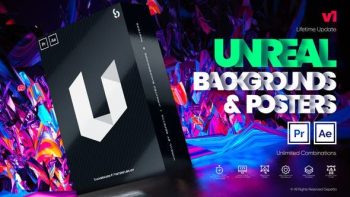
Both are available in After Effects and PremierenPro ready to be used in different concepts and any social media agency.
Unreal have different poster categories that will cover your different needs from abstract, fashion, sports, corporate, special events, retro, technology, marketing, lux and art. There are endless combinations of backgrounds, colors, typographies and add ons to make unique posters and create your own brand.
The Unreal Extension makes it more enticing and gives you a smooth and trouble-free experience in making poster animations.
INCLUSIONS:
Ready-made animated backgrounds and posters
10 Different poster categories such as: abstract, fashion, sports, corporate, special events, retro, technology, marketing, lux and art. Animated Add Ons, Devices and Neons
Responsive design/Auto Resize
Unreal Extension (in AE) for smooth and effortless work
Lifetime update of designs
No plugins required
Works with PP CC 19 and above
Works with AE CC 19 and above
Works for all language of AE
Fast Render
Video Tutorials
https://vimeo.com/521846671
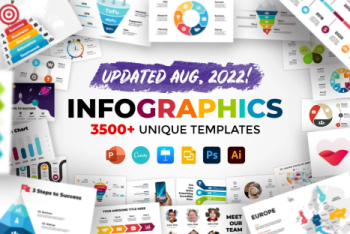
Everybody loves a good infographic. Create your next presentation in minutes with The Biggest Infographics Bundle on the Internet.
This huge package contains literally everything you will ever need to create an engaging presentation: tons of diagrams, charts, maps, timelines, mockups, photo slides and many many more.
This Bundle is perfect for any industry from business, marketing or creative thinking to medicine, ecology and education.
Total value of all included products is more than $1000. You save more than 96%! No graphic skills required.
All elements are super easy to customize in PowerPoint, Keynote, GoogleSlides, Photoshop, Illustrator & Canva.com.
All slides are fully animated. Video preview: https://vimeo.com/521846671 Light and dark color schemes are included.
All new products will be added here as FREE UPDATES
Infographic elements contains:
- Illustrations
- Circle diagrams
- Charts
- Arrows
- Timelines
- Geometric figures
- Maps
- Electronic Device Mockups
- Watercolor brush elements
- Signs and symbols
- Lettering
- Banners
- Brush strokes
- Puzzle
- Social media icons
- Pricing plans
- Abstract layouts
- Sales funnels
- Schemes
- Business graphs
- Dark infographics
- Linear graphic
- Icons
- Neumorphic elements
- 3D elements
- eDevices Mockups
Included templates on the following topics:
- Business
- Marketing
- Startup
- Finance
- Internet
- Digital Research
- Time Management
- Success
- Medicine
- Covid-19 Vaccination
- Science
- Shopping
- Ecology
- Education
- Social media
- Portfolio
- Creative Thinking
- Strategy
List of Updates:
- August 2022 – added Icons Pack
- April 2022 – updated Strategy. Added Canva version of Strategy and Ecology ● February 2022 – added Success
- January 2022 – added Devices
- October 2021 – updated Startup and Business
- August 2021 – added Digital, updated Creative Thinking and Multipurpose ● June 2021 – added Creative Thinking and Multipurpose
- May 2021 – added Canva version of Maps
- February 2021 – added Covid-19, Neumorphic, Arrows part 2; updated Project, added Canva versions of Covid-19, Neumorphic, Arrows part 1, Arrows part 2, Business, Marketing, Startup, Education, Medicine
- December 2020 – added Canva version of 3D Infographics Pack ● November 2020 – added 3D Infographics Pack and Canva version of Project ● August 2020 – added Animated Slides Bundle
- July 2020 – added animation to all templates (except of Calendar), added dark version to all templates (except of Calendar and Watercolor)
- June 2020 – added animation to Project, updated Photo Slides (now also with animation)
- April 2020 – updated Maps (added 100 new countries)
- March 2020 – added 100 Diagrams with Image Placeholders ● February 2020 – added Animated Mockups Bundle
- November 2019 – added Watercolor
- May 2019 – added Google Slides version; updated Project, Marketing, Banners, Abstract
- February 2019 – added Ecology
- September 2018 – added Abstract
- July 2018 – added Banners
- February 2018 – added Free Bonus – Photo Slides
- November 2017 – added Timelines, Calendar, updated Project, Dark, Pro ● October 2017 – updated Maps, Dark, Project
- September 2017 – added Puzzle, updated Project
- August 2017 – added Arrows
- July 2017 – added Geometry
- June 2017 – added Social Media, Alphabet, Project
- May 2017 – added Strategy
- April 2017 – added Business, Pro
- March 2017 – added Maps, Education
- February 2017 – added Marketing
- January 2017 – added Dark
- December 2016 – added Startup
- November 2016 – added Minimal, Charts
Mockups Bundle includes next devices at this moment (it is updatable too):
- Mac Pro
- Pro Display XDR
- iMac
- iMac Pro
- Apple Thunderbolt Display
- MacBook Pro 13”
- MacBook Pro 15”
- MacBook Air
- MacBook
- Dell XPS 15”
- Dell UltraSharp 5K
- Huawei MateBook X
- Microsoft Surface Book 2
- Microsoft Surface Studio
- ASUS ZenBook Pro Duo
- iPhone 8
- iPhone X
- iPhone 11 Pro
- Samsung Galaxy S10
- Samsung Galaxy S10
- Samsung Galaxy Note 10
- Samsung Galaxy Fold
- Xiaomi Mi Mix Alpha
- iPad Pro
- iPad
- Microsoft Surface Pro
- Wacom Tablet
- Samsung Galaxy Tab
- Apple iWatch Series 5
- Motorola Moto 360
Maps includes more than 100 vector countries divided into provinces. The largest cities of each country are indicated with special markers. It also includes a world map and maps of all continents, divided into countries.
Europe: Albania, Austria, Azerbaijan, Belarus, Belgium, Bosnia and Herzegovina, Bulgaria, Croatia, Cyprus, Czech Republic, Denmark, Estonia, Finland, France, Georgia, Germany, Greece, Hungary, Iceland, Italy, Latvia, Lithuania, Macedonia, Malta, Moldova, Montenegro, Netherlands, Norway, Poland, Portugal, Romania, Russia, Serbia, Slovakia, Slovenia, Spain, Sweden, Switzerland, Ukraine, United Kingdom (Great Britain, England)
Asia & Oceania: Australia, New Zealand, Afghanistan, Cambodia, China, India, Indonesia, Iran, Iraq, Israel, Japan, Kazakhstan, Kuwait, Kyrgyzstan, Laos, Malaysia, Mongolia, North Korea, Pakistan, Philippines, Saudi Arabia, Singapore, South Korea, Sri Lanka, Syria, Tajikistan, Thailand, Turkey, Turkmenistan, United Arab Emirates, Uzbekistan, Vietnam
North and South America: North: Canada, Costa Rica, Cuba, Dominican Republic, Guatemala, Honduras, Mexico, Nicaragua, Panama, United States of America; South: Argentina, Bolivia, Brazil. Chile, Colombia, Ecuador, Guyana, Paraguay, Peru, Uruguay, Venezuela
Africa: Algeria, Angola, Botswana, Cameron, Chad, Egypt, Ethiopia, Gabon, Guinea, Kenya, Libya, Madagascar, Mali, Mauritania, Mozambique, Niger, Nigeria, South Africa, Tanzania, Tunisia, Zimbabwe
Main features:
- All updates are absolutely free
- All objects are fully editable
- Live editable text
- All slides are fully animated
- 16×9 Aspect Ratio
- Dropbox Sync
- Quick support

The pack encompasses 50 Animated Backgrounds, making it a perfect toolset for any motion design project.
You can use it to enhance your animations and motion graphics, just by dragging any element into your composition and transforming the image and background.
Each animation is loop-ready, for creating seamlessly looped sequences in your favorite video editing software.
Features:
50 Animated Backgrounds
Seamlessly Looped
4K Ultra HD Resolution 3840×2160, 30 fps
Compatible With:
-Adobe Premiere Pro
-Adobe After Effects
-Final Cut Pro
-Davinci Resolve
-HitFilm Pro
-Vegas Pro
-Other Video Editing Software
Are you gearing up to host an unforgettable festival or event? Our Festival Template Bundle is your ultimate companion, offering a comprehensive collection of professionally designed templates to elevate every aspect of your festival planning. From promotional materials to organizational tools, this bundle has everything you need to create a cohesive and visually stunning festival experience.
Key Features:
- Event Flyers and Posters: Grab attention and generate buzz with eye-catching flyers and posters. Customize these templates with your festival’s theme, lineup, dates, and venue details to entice potential attendees.
- Social Media Graphics: Engage your audience on social media platforms with striking graphics optimized for various networks. Share event updates, artist announcements, and countdowns with style.
- Ticket Designs: Create visually appealing and branded tickets that not only serve as entry passes but also leave a lasting impression on your attendees.
- Program Booklet: Guide festival-goers through the schedule, lineup, and essential information with a professionally designed program booklet.
- VIP Passes and Lanyards: Treat your VIP guests to a memorable experience with exclusive VIP passes and lanyards that exude prestige.
- Press Release Templates: Reach out to the media with confidence using press release templates that showcase your festival’s highlights and unique selling points.
- Vendor and Sponsorship Proposals: Attract vendors and sponsors with well-designed proposals outlining the benefits of partnering with your festival.
- Signage and Banners: Ensure smooth navigation and enhance the festival ambiance with attention-grabbing signage and banners.
- Merchandise Designs: Boost your festival’s branding and revenue with merchandising templates for T-shirts, caps, and other collectibles.
- Event Ticketing and RSVP Forms: Streamline the ticketing process and RSVP management with editable forms that integrate seamlessly with popular ticketing platforms.
Bundle Benefits:
- Time-Saving: Avoid the hassle of starting from scratch. Our templates are pre-designed and easy to customize, saving you valuable time during the festival planning process.
- Professional Quality: Impress your audience and partners with high-quality designs that reflect the professionalism and uniqueness of your festival.
- Cohesive Branding: Maintain a consistent brand image across all festival materials, creating a memorable and immersive experience for attendees.
- Versatility: The templates are compatible with popular graphic design software, ensuring flexibility and ease of use for both beginners and experienced designers.
Host your festival with confidence and creativity using our Festival Template Bundle. Embrace the power of stunning visuals and compelling designs to make your event an unforgettable success. Get your bundle today and take your festival planning to the next level!
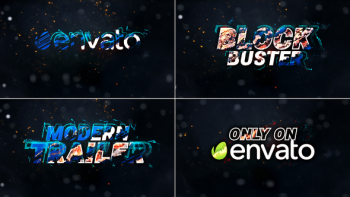
Action Intro Trailer Titles // Movie Trailer // Action Trailer 39344067. Action Intro Trailer Titles is perfect for all kind of Movie Trailer,
cinematic blockbuster, war trailer, heroic introduction,
war documentary, film teasers, War/battle/history Movie trailers.
it`s very good organized and PDF help file included. Enjoy !!.
Features:
NO Plugin Required, Very simple to edit
Works with After effects cc 2015 & above
Multi-purpose
Animation Length 00:60 Second
Full HD Resolution 1920×1080
Easy to Edit Text, you can use text instead of logo
12 Text or logo Placeholders
Quick and Easy Customization
Free Font Download Link
Detailed PDF help file included
Fast Render
Music not included, you can buy it:
https://audiojungle.net/item/hybrid-trailer/19114379
Font not included, you can free Download here:
https://www.fontsquirrel.com/fonts/roboto
Please leave us a five-star review & help us to continue improving My products.
Video Player
Unlock the power of branding with our Mega Logo Designs Bundle, a vast and diverse collection of professionally crafted logo designs suitable for a wide range of businesses and projects. Whether you’re a startup, established company, freelancer, or creative professional, this bundle offers an extensive selection of unique and customizable logo designs to elevate your brand identity and make a lasting impression on your audience.
Key Features:
- Extensive Logo Library: Access a comprehensive library of logo designs, spanning various industries, styles, and themes. Find the perfect logo that aligns with your brand personality and message.
- Versatility: Our Mega Logo Designs Bundle caters to a multitude of businesses, from technology and finance to food, fashion, and more. You’re sure to discover a logo that suits your specific niche.
- High-Quality Designs: Each logo in the bundle is meticulously crafted by experienced designers, ensuring professional-grade aesthetics and attention to detail.
- Fully Customizable: Tailor the logos to suit your brand’s unique colors, fonts, and preferences. Edit and modify the designs easily using vector files, providing complete creative control.
- Multiple File Formats: Receive logo designs in various file formats, including AI, EPS, SVG, PSD, and PNG, ensuring compatibility with various graphic design software and platforms.
- Scalable Vector Graphics: The logos are created as vector graphics, enabling seamless scaling without any loss of quality. Use them across various applications, from business cards to billboards.
- Print and Web Ready: Our logos are optimized for both print and web use, providing versatility in marketing materials, websites, social media, and more.
- Time-Saving Solution: Skip the lengthy and costly process of designing a logo from scratch. Our bundle offers an extensive library of pre-made designs, saving you valuable time and resources.
Benefits:
- Brand Enhancement: Establish a strong brand identity with a professionally designed logo that reflects your values, vision, and brand essence.
- Streamlined Design Process: Quickly find the ideal logo for your business or project, eliminating the need for time-consuming design iterations.
- Cost-Effective Solution: Save money on expensive design services by choosing from our extensive logo collection at a fraction of the cost.
- Quick Implementation: Use our fully customizable logo designs to expedite the process of branding your business or launching new projects.
- Stand Out from the Competition: A unique and well-crafted logo sets your brand apart, helping you leave a memorable impression on your target audience.
Upgrade your brand’s visual identity with our Mega Logo Designs Bundle. Access an extensive selection of high-quality and customizable logo designs, perfect for businesses and projects across various industries. Enhance your brand recognition and establish a strong visual presence with professional-grade logos. Download now and take the first step toward branding success!

There are templates of every style, including business, medical, social media, ecological, maps, cycles, and much more. Each template comes in AI, EPS, PSD, PNG, and JPG file format, so you can use them in Illustrator, Photoshop, or any other software, and adapt them easily to your specific needs.
Only free fonts are used in these templates, and links to download and install them are included as well.
MAIN FEATURES:
– Well organized
– Fully layered
– 100% Vector
ZIP PACKAGE INCLUDES:
– 200 EPS10 files
– 200 AI CS2 files with editable text
– 200 PSD layered files
– 200 JPEG files
– 200 PNG files on a transparent background without texts and icons for each infographic
Included items:
– Cycle infographic pack
– Ecological infographics
– Social media infographics
– Fresh infographics pack
– Business infographics pack
– Maps and markers infographic pack – Medical infographics pack
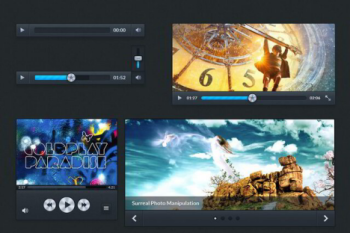
Hundreds of web elements.
Download a well layered PSD kit that is handy for and web designer/developer to create good looking interfaces.
Use it for quick prototyping in your Photoshop projects.
Number of items: 300 | File format: .psd
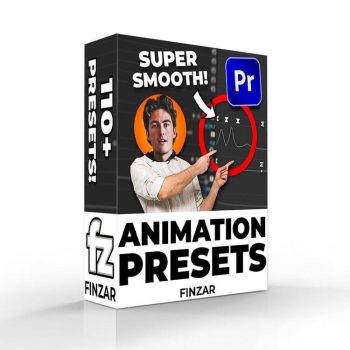
With this pack you’ll be able to quickly create animations similar to those found on videos from TommyInnit (or basically any other minecraft YouTuber)…
This pack includes 1 version of the preset pack; some of the ‘intro’ shakes may not work as intended on Premiere versions previous to 2022. So please purchase if you have the latest version of Premiere. You have been warned!
What’s Included?
- Shakes
– Flash meme
– Standard Shake (x15)
– Wobble Shake (x15)
– Rotation Shake (x15) - PNG Animation
– PNG Drop Shadow
– Transform (Motion Blur)
– 3D Animations (x4)
– Nudges (x8)
– Sways L R (x6)
– Movement (x10)
– Slides (x20) - Misc
-Intro Shakes (x8)
-Stretch Effect (x7) - 3 PNG Characters for you to insert your own head into (to apply these presets onto).
ITEM DETAILS
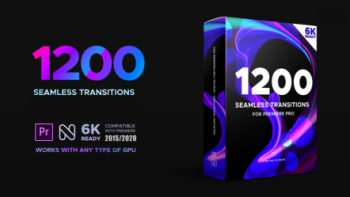
Looking for great transitions for Premiere Pro? Here is the Seamless Transitions Pack for you. It is a great way to make your cuts more interesting, modern, and dynamic! These transitions allow you to easily stand out from the crowd with 800 dynamically animated transition effects. Perfect for your
slideshow, openers, intros, and much more. These transitions will help you quickly. Great for just about any video project. Enjoy the Version 5!
Multiple Categories
- Glitch, Pan, Zoom, Rotation, Split, Stretch, Twirl, Perspective, Lens Flare, Panorama, Spin, Wraps, Flat, Etc
Supported Applications
- Premiere Pro CC 2015 and above – GPU acceleration (Cuda or OpenCL)
FEATURES:
- Awesome plugin included with the project
- Works with any FPS
- Works with any resolution
- 100% Premiere Pro (No After Effects needed)
- Easy to use even if you are a beginner
- User-friendly project structure
- Fast previews right inside Premiere Pro
- Various transition speed
- Sound FX included
- Prompt technical support
USAGE:
- Easy & fast installation (less than a minute) ● No need to resave project files before the import ● No need to disable layers before applying transitions! ● Auto-resize to any resolution/aspect ratio

AtomX is an extension for after effects & premiere pro. Here vfxdownload gathered most of all packs of atomx extension which support after effects and premiere pro.
42 AtomX Packs Collection
Here is the list, which is included in combo downloads.
- AtomX Text Effect 46896703 (Information)
- AtomX Text Presets 23150189 (Information)
- AtomX Text Presets 45231394 (Information)
- AtomX Titles V1.01 28464847 (Information)
- AtomX YouTube Essential Library – After Effects 38510264 (Information)
- AtomX YouTube Library V2.1 27009072 (Information)
- AtomX 6-in-1 Graphics Pack – 6000 Elements v6.1 24321544 (Information)
- AtomX 555 Essential Titles and Lower Thirds 31130393 (PR AE) (Information)
- AtomX 650 Glitch Elements v1.0 29662551 (Information)
- AtomX 1200 Instagram Stories Big Pack 34945189 (Information)
- AtomX 1500 Transitions For After Effects 37533954 (Information)
- AtomX 4500 Motion Presets 46047999 (Information)
- AtomX 4500 Graphics Pack 25010010 (Information)
- AtomX All-In-One Bundle V7.2 24321544 (Information)
- AtomX Backgrounds Pack 32623942 (Information)
- AtomX BASE Transitions and Motion Graphics for After Effects v3 31018620 (Information)
- AtomX BASE Transitions and Motion Graphics for Premiere Pro 29733181 (Information)
- AtomX Big Pack of Typography 23584216 (Information)
- AtomX Collage Constructor Bundle 39658999 (Information)
- AtomX Collage Pack v2.1 39220432 part 1-2 (Information)
- AtomX Crispycut Transitions v1.1 26829624 (Information)
- AtomX Effects Pack V1.0 – Transitions ,Effects ,Footages and Presets 45891082 (Information)
- AtomX FRACTAL X – 650 Glitch Pack 36865814 (Information)
- AtomX Graphics Pack Rise v1.0 29704909 (Information)
- AtomX Ibg 300 Loop Backgrounds 35090369 (Information)
- AtomX iBG 300 Loop Backgrounds for Premiere Pro 35904445 (Information)
- AtomX Instagram Stories 33921479 (Information)
- AtomX Instagram Stories Big Pack V3 34945189 (Information)
- AtomX Instagram Stories For Premiere Pro v7.1 34020079 (Information)
- AtomX Instagram Stories v7.1 21895564 (Information)
- AtomX Just Typography Pack 33130966 (Information)
- AtomX Just Typography Pack for Premiere Pro 34410712 (Information)
- AtomX Medical Constructor 27636317 (Information)
- AtomX MegaMotion Animation Motion Presets 40576931 (Information)
- AtomX Motion Graphics Pack 550 Animations Pack 23678923 (Information)
- AtomX Romantic Pack V2.0 33485560 (Information)
- AtomX Seamless Loop Kinetic Posters v15.4 24684532 (Information)
- AtomX Shape Elements Library 28873541 (AE PR) (Information)
- AtomX Social Pack 33516017 (Information)
- AtomX Sparkly – Photo Effects Pack (Information)
- AtomX Stream Overlays Elements Bundle 35300585 (Information)
- AtomX Technology Constructor V2.5 25146667 (Information)


Reviews
There are no reviews yet.